
Professional printing depends heavily on the quality of the artwork supplied for production. Businesses use logos and graphics on business cards, brochures, packaging, uniforms, banners, signs, promotional products, and vehicle graphics. However, many designs are originally saved as JPG or PNG files that can become blurry or pixelated when enlarged. trusted vector file conversion transforms these raster images into scalable and editable artwork that can provide better results for professional printing.
Vector graphics are created with mathematical paths rather than fixed pixels. This means they can be resized without losing sharpness or clarity. A properly converted vector file also makes it easier for printers and designers to adjust artwork for different sizes, materials, and production methods.
For businesses that depend on consistent branding and professional printed materials, using accurately converted artwork can reduce production problems while improving the overall quality of finished products.
What Is Vector File Conversion?
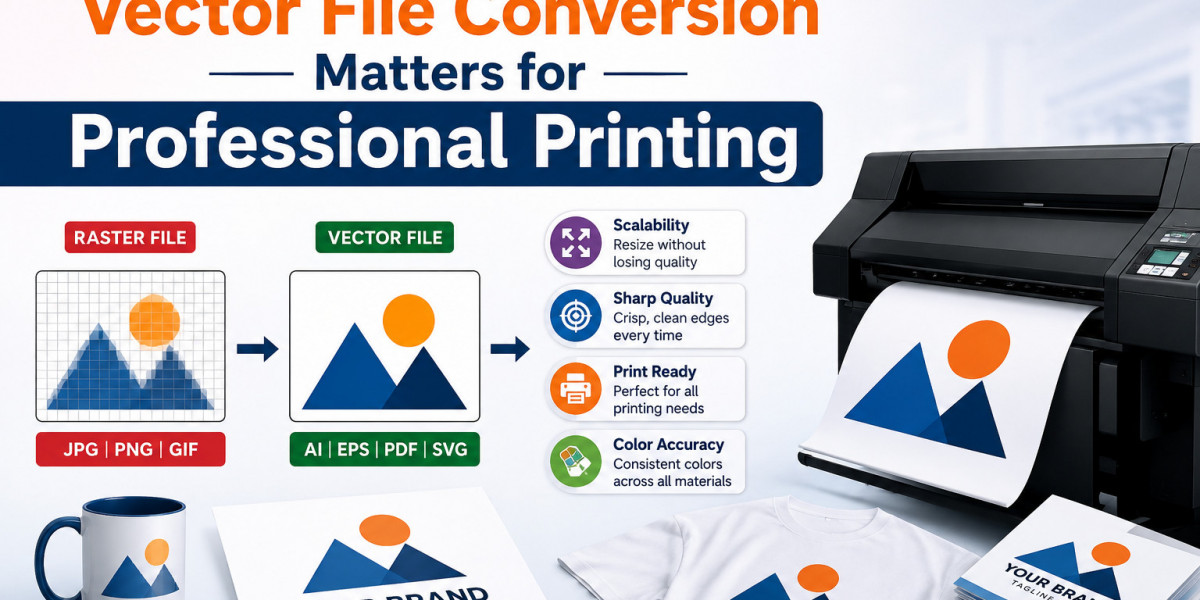
Vector file conversion is the process of recreating a raster image as vector artwork. Raster files such as JPG, PNG, BMP, and TIFF are made from pixels. When these images are enlarged beyond their original resolution, the pixels become more noticeable and the artwork may appear blurry.
Vector files use paths, curves, lines, and shapes instead of fixed pixels. Common vector formats include AI, EPS, SVG, PDF, and CDR.
During professional conversion, a vector artist reviews the original artwork and manually recreates its important elements. The final file can then be edited, resized, and prepared for different printing applications.
Why Trusted Conversion Matters
Not every vector conversion produces the same result. Automatic tracing tools can create rough curves, excessive anchor points, inaccurate shapes, and poorly reconstructed text.
A trusted vector conversion provider focuses on accuracy and production requirements. The artist checks the original artwork, recreates important details, cleans up paths, and prepares the final file according to its intended use.
This additional attention is especially important when converting business logos, detailed illustrations, and artwork used for commercial printing.
1. Better Print Clarity
Sharp artwork is essential for professional printing.
Low-resolution images may produce jagged edges, blurry text, and unclear details when printed at larger sizes. Properly converted vector artwork maintains smooth curves and clean outlines.
This helps logos and graphics reproduce clearly on brochures, business cards, packaging, banners, apparel, and promotional materials.
2. Unlimited Scalability
Businesses often use the same logo at different sizes.
A small version may be required for a business card, while a large version may be needed for a storefront sign or vehicle graphic. With vector artwork, the same file can be resized without creating pixelation.
This eliminates the need to recreate the logo each time a different print size is required.
3. Accurate Logo Reproduction
A business logo contains important visual elements that should remain consistent.
Professional vector conversion carefully preserves shapes, proportions, curves, lettering, spacing, and other design characteristics.
Accurate reproduction helps businesses maintain the same logo appearance across different marketing materials and production platforms.
4. Consistent Brand Colors
Color consistency is important for businesses using their logos across multiple products.
Professionally prepared vector files allow colors to be defined and adjusted more precisely. Designers and printers can use the artwork as a reliable source when preparing files for different printing processes.
Consistent color treatment helps maintain a recognizable visual identity across business cards, packaging, apparel, signage, and promotional products.
5. Compatibility With Different Printing Methods
A business may use several printing techniques depending on the product.
Vector artwork can support applications such as:
- Digital printing
- Offset printing
- Screen printing
- Heat transfer
- Sublimation
- Vinyl cutting
- Large-format printing
- Sign production
A professionally prepared master file can be adapted for different production requirements without sacrificing artwork quality.
6. Easier Editing
Vector files are usually made from individual editable elements.
Designers can modify colors, shapes, text, and other components without rebuilding the entire logo.
This becomes useful when a company changes its brand colors, updates a tagline, creates a promotional variation, or needs a different version for a particular product.
Editable artwork therefore provides greater flexibility for future projects.
7. Reduced Production Delays
Poor-quality artwork often requires additional preparation before printing.
Printers may need to repair curves, remove unwanted elements, recreate text, or fix blurry images. These corrections can delay production.
Trusted vector conversion provides cleaner artwork from the beginning, reducing the amount of repair work required before production.
This can help businesses and printing companies maintain a more efficient workflow.
Vector Conversion for Large-Format Printing
Large-format printing places significant demands on artwork quality. Banners, vehicle graphics, trade show displays, outdoor signs, and wall graphics can be several feet wide.
A small raster image that looks acceptable on a computer screen may become heavily pixelated when enlarged.
Vector artwork is particularly useful for these applications because it can be scaled to large dimensions while preserving smooth edges and clear design elements.
Vector Artwork for Promotional Products
Businesses use logos on a wide range of promotional products, including shirts, bags, mugs, pens, labels, packaging, and displays.
Each product can have different dimensions and production requirements. A professionally converted vector logo can be adjusted for these applications without losing its original quality.
Maintaining a reliable master file also reduces the risk of using outdated or inconsistent logo versions.
Vector Files and Embroidery Digitizing
Vector artwork can also provide useful source material for embroidery digitizing.
Clean outlines and accurate shapes help digitizers identify the important parts of a logo before creating a machine embroidery file.
However, a vector file is not itself an embroidery file. It must still be digitized with appropriate stitch types, density, underlay, sequencing, and compensation for the intended fabric.
A clean vector source can make this preparation process more efficient.
Manual Conversion vs. Automatic Tracing
Automatic tracing can be useful for simple images, but it does not always produce production-ready artwork.
Automated conversion may create too many anchor points, rough curves, broken shapes, or inaccurate lettering. These issues can become noticeable during printing.
Manual vector conversion allows an experienced artist to review and correct these problems. The artist can simplify paths, refine curves, recreate text, and organize the artwork for easier editing.
For important business logos and commercial artwork, manual attention can provide greater accuracy and reliability.
How to Choose a Trusted Vector Conversion Service
Before choosing a provider, review the quality of its previous work and confirm that it understands commercial printing requirements.
Consider factors such as:
- Manual vector conversion
- Experienced graphic artists
- Multiple vector file formats
- Quality control
- Fast turnaround
- Revision support
- Clear communication
- Portfolio of completed projects
It is also useful to explain how the artwork will be used. A logo intended for large-format printing may require different preparation from artwork intended for apparel or embroidery.
Common Mistakes to Avoid
Businesses often create unnecessary printing problems by using screenshots, low-resolution website images, or compressed logos as final artwork.
Avoid enlarging small JPG files for large prints or relying entirely on automatic tracing software. It is also important to provide the best available source artwork and communicate the intended print size and production method.
These steps help the vector artist prepare a file that better matches the project's requirements.
Conclusion
Trusted vector file conversion is an important part of professional printing because artwork quality directly affects the finished product. Properly converted vector files provide sharp graphics, unlimited scalability, accurate logo reproduction, editable elements, and better compatibility with different production methods.
Professional conversion can also reduce production delays by providing clean artwork that requires fewer corrections before printing. For businesses that use logos and graphics across packaging, apparel, promotional products, signage, and marketing materials, maintaining a reliable vector master file is a practical long-term investment.
iDigitize provides vector file conversion services designed to create clean, scalable, editable, and production-ready artwork for professional printing and other commercial applications.
Frequently Asked Questions
Q1. What is trusted vector file conversion?
Trusted vector file conversion is the professional process of recreating raster artwork as scalable vector graphics while preserving important design details and preparing the file for production.
Q2. Why are vector files better for professional printing?
Vector files remain sharp when resized, making them suitable for both small printed products and large-format applications.
Q3. Which vector formats are commonly used?
AI, EPS, SVG, PDF, and CDR are commonly used vector formats, depending on the design software and production requirements.
Q4. Can vector conversion improve large-format printing?
Yes. Vector artwork can be enlarged significantly without the pixelation commonly associated with low-resolution raster images.
Q5. Can a vector file be used for embroidery?
Yes. Vector artwork can serve as source artwork for embroidery digitizing, but it must be converted into a machine-readable embroidery format before stitching.
Q6. Why choose manual vector conversion?
Manual conversion allows artists to correct rough curves, inaccurate shapes, excessive anchor points, and other issues that automatic tracing may leave behind. This can produce cleaner and more reliable artwork for professional production.