
High-quality artwork is important for businesses that use logos and graphics across print, digital, packaging, apparel, signage, and promotional materials. However, many businesses still have their original logos in low-resolution JPG, PNG, scanned, or outdated formats. These files may look acceptable at a small size but can become blurry or pixelated when enlarged. A custom vector art conversion service can recreate this artwork as scalable vector graphics that are easier to edit, resize, and prepare for different production requirements.
Vector conversion involves more than changing a file extension. Professional conversion recreates artwork using paths, curves, shapes, typography, and colors. The final result can provide a flexible master file for future design and printing needs.
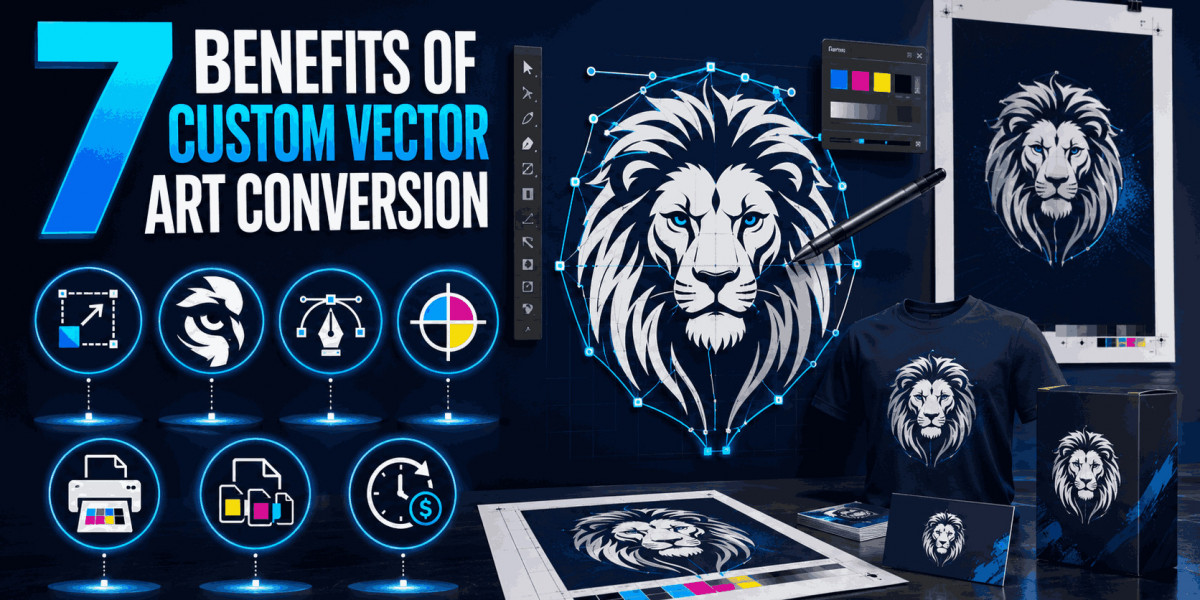
Here are seven important benefits of using a custom vector art conversion service.
1. Scalable Artwork Without Pixelation
One of the biggest advantages of vector artwork is scalability.
Raster images are made from pixels, so enlarging a low-resolution JPG or PNG can make edges appear blurry or jagged. This becomes especially noticeable when a logo is enlarged for a banner, sign, vehicle graphic, or large display.
Vector graphics use paths and mathematical coordinates instead of fixed pixels. This allows the artwork to be resized while maintaining smooth curves and clean edges.
A professionally converted logo can therefore be used at different dimensions without the same pixelation problems associated with low-resolution raster artwork.
2. Cleaner and More Accurate Logo Reproduction
A business logo represents its visual identity, so accuracy matters.
Low-quality source files can contain blurred edges, distorted curves, unclear lettering, or compressed colors. Professional vector conversion allows the artwork to be carefully reconstructed.
The designer can review the original logo and recreate its major elements using clean paths and shapes.
This includes:
- Logo symbols
- Typography
- Curved outlines
- Geometric shapes
- Borders
- Color areas
Careful reconstruction helps preserve the intended proportions and appearance of the original design.
3. Better Printing Results
Professional printing requires artwork that can meet the required size and production specifications.
A small raster image may not provide enough resolution for high-quality printing. Enlarging it can expose pixelation and reduce clarity.
A vector master file can be scaled according to the printing requirements.
This makes vector artwork useful for business cards, brochures, packaging, labels, signs, banners, posters, and other printed materials.
However, vector artwork alone does not guarantee perfect printing. The final result also depends on the printer, substrate, ink, color settings, and production process.
4. Greater Flexibility Across Different Applications
Businesses rarely use their logos in only one place.
The same artwork may appear on websites, social media, business cards, uniforms, packaging, promotional products, signage, and advertisements.
A vector master file provides a flexible source that can be adapted to these different applications.
The artwork can be resized, repositioned, recolored, or adjusted according to the requirements of each project.
This reduces the need to recreate the logo from scratch whenever a new application is introduced.
5. Editable Design Elements
Another major benefit is editability.
A properly created vector file can contain separate paths and objects. This allows individual elements to be modified without rebuilding the entire design.
For example, a designer may need to:
- Change a color
- Adjust a shape
- Modify spacing
- Resize an element
- Edit an outline
- Create a variation of the logo
This flexibility is useful for businesses that expect their branding materials to change over time.
6. Access to Multiple Useful File Formats
Different applications and production systems may require different vector formats.
Common formats include AI, EPS, SVG, PDF, and CDR.
A custom conversion provider can prepare the artwork according to the required format.
For example, a printer may request EPS or PDF, while a web or digital application may use SVG.
Having suitable formats available can make it easier to share the artwork with printers, designers, manufacturers, and other production partners.
7. Better Long-Term Brand Consistency
A professionally converted vector logo can become a useful master branding asset.
Without a reliable master file, businesses may repeatedly resize or recreate low-quality versions of their logo. This can lead to differences in proportions, colors, spacing, and typography.
A properly prepared vector master provides a consistent source for future artwork.
When different designers or vendors need the logo, they can work from the same master file instead of using unrelated low-resolution copies.
This can help maintain consistency across multiple business materials.
Why Custom Vector Conversion Is Better Than Simple Image Enlargement
Some businesses try to solve low-resolution problems by increasing the dimensions of an existing JPG or PNG.
This approach does not actually recreate the artwork.
Image enlargement may add pixels through interpolation, but the underlying design remains raster-based.
Vector conversion takes a different approach by rebuilding the artwork with scalable paths.
The difference becomes particularly important when the logo needs to be enlarged substantially for professional printing.
Manual Vectorization vs. Automatic Tracing
Automatic tracing software can be useful for simple graphics, but it may produce results that require significant cleanup.
Automatic tracing can create excessive anchor points, uneven curves, unnecessary shapes, and inaccurate details.
Manual vectorization allows the designer to review the artwork and refine important elements.
Typography, curves, proportions, color areas, and alignment can be checked individually.
For complex business logos, this additional attention can improve the usability of the final vector file.
When Businesses Need Vector Art Conversion
Vector conversion can be useful in several situations.
A business may have only a low-resolution logo from an old website. A company may need to print its logo on a large sign. A manufacturer may request an editable vector file. A marketing team may need the logo in several formats.
In each situation, professionally converted vector artwork can provide a more flexible solution than relying on a small raster image.
Vector Conversion for Large-Format Printing
Large-format printing places greater demands on artwork quality.
Banners, signs, displays, vehicle graphics, and wall graphics can require logos to be reproduced at large dimensions.
A low-resolution raster logo may become visibly pixelated when enlarged.
A vector master can be scaled to the required dimensions while maintaining smooth paths.
This makes vector conversion particularly useful for businesses involved in signage and large promotional graphics.
Vector Conversion for Packaging
Packaging requires accurate branding and precise artwork placement.
A business may use its logo on boxes, labels, bags, containers, and product inserts.
Vector artwork can be resized for different packaging dimensions while preserving the logo's structure.
Individual elements can also be adjusted when packaging layouts change.
Vector Conversion for Apparel and Promotional Products
Logos used on shirts, jackets, bags, caps, mugs, stickers, and other promotional products may require different production methods.
Screen printing, heat transfer, vinyl cutting, embroidery, and other processes can have different artwork requirements.
A clean vector master can serve as the source for adapting the logo to these production methods.
The final production file may still require additional preparation based on the specific equipment and process.
How to Prepare Artwork for Vector Conversion
The best starting point is the highest-quality source artwork available.
Provide the original logo rather than a screenshot whenever possible.
Useful information includes the original image, brand colors, font details, desired file formats, intended application, dimensions, and brand guidelines.
If exact colors or typography are important, communicate those requirements before the conversion begins.
This gives the vector artist better information for recreating the design accurately.
How to Check the Final Vector File
After receiving the converted artwork, inspect it carefully.
Open the file in compatible vector software and zoom into curves, corners, typography, and color boundaries.
Check whether the artwork contains actual vector paths rather than an embedded raster image.
If the file is expected to be editable, verify that individual design elements can be selected and modified.
Also compare the final artwork with the original reference to ensure proportions and important details have been preserved.
Common Mistakes When Choosing a Vector Conversion Service
Choosing a provider only because of a low price can create quality problems.
Businesses should also avoid assuming that automatic tracing will always produce professional results.
Another mistake is failing to communicate the intended use of the artwork.
A logo for a large outdoor sign may have different preparation requirements from a logo intended for a small label.
Reviewing previous vector conversion work and asking about file formats, revisions, and quality checks can help businesses make a more informed decision.
How to Choose a Custom Vector Art Conversion Service
Look for a provider with experience in logo vectorization and complex artwork reconstruction.
Review examples of actual work and pay attention to curves, typography, alignment, proportions, and path quality.
Ask which formats are provided and whether the files are editable.
It is also useful to confirm the revision policy and turnaround time before ordering.
A reliable provider should be able to understand the intended application and prepare the artwork accordingly.
Conclusion
Using a Custom Vector Art Conversion Service can provide significant benefits for businesses that need flexible, scalable, and editable artwork. Professional conversion can improve logo clarity, support better printing, provide multiple file formats, simplify future editing, and help maintain consistent branding.
The process is especially useful when a business only has a low-resolution JPG, PNG, scanned logo, or outdated artwork. Instead of repeatedly enlarging or recreating the same image, a professionally prepared vector master can serve as a long-term source for different design and production applications.
iDigitize provides custom vector art conversion services for logos and graphics, helping businesses prepare scalable, editable artwork for printing, branding, apparel, packaging, signage, and other production requirements.
Frequently Asked Questions
Q1. What is a custom vector art conversion service?
It is a professional service that recreates existing raster or low-resolution artwork as scalable vector graphics using paths, curves, shapes, and editable elements.
Q2. Can a low-resolution JPG be converted into a vector?
Yes. A JPG can be used as a reference to recreate the design as vector artwork.
Q3. What are the main benefits of vector conversion?
Key benefits include scalability, cleaner edges, editable artwork, flexible file formats, better print preparation, and improved brand consistency.
Q4. Is vector conversion the same as enlarging an image?
No. Enlarging a raster image changes its dimensions, while vector conversion recreates the artwork using scalable paths.
Q5. Which vector formats are commonly delivered?
Common formats include AI, EPS, SVG, PDF, and CDR. The best format depends on the intended use.
Q6. Can vector artwork be used for printing?
Yes. Vector artwork is commonly used for logos, signs, packaging, apparel graphics, labels, promotional products, and many other print applications.
Q7. How can I choose a reliable vector conversion provider?
Review previous work, check the quality of paths and typography, confirm supported formats, ask about revisions, and explain the intended use of the artwork before ordering.