
Managing work effectively becomes harder as businesses grow. Tasks move between people, deadlines change, priorities compete, and important updates can become scattered across emails, spreadsheets and chat messages. Task management software brings this information into a structured system, helping teams understand what needs to be done, who is responsible and when work is due.
The right solution is not simply a digital to-do list. It can provide a clearer view of workflows, support collaboration, track progress and connect everyday tasks with broader business operations.
What Is Task Management Software?
Task management software is a digital system used to create, assign, organise, monitor and complete work. A typical task may include an owner, deadline, priority, description, checklist, status and supporting files or comments.
Unlike a basic spreadsheet or personal to-do list, dedicated software can connect individual tasks with projects, workflows and team activity. For example, a marketing agency might create a campaign project, assign copywriting and design tasks to different employees, set deadlines and monitor progress from a central dashboard.
This structure is particularly useful when several people contribute to the same workflow. Instead of relying on someone to remember the next step, responsibilities and deadlines can be recorded and tracked.
Key Features to Look For
Not every business needs the same functionality. However, several capabilities are particularly useful when evaluating task management tools.
Task Creation and Assignment
Users should be able to create tasks quickly and assign them to specific team members. Clear ownership reduces uncertainty about who is responsible for completing each piece of work.
Priorities and Deadlines
Priority levels and due dates help teams distinguish urgent work from tasks that can wait. Recurring deadlines can also be useful for routine activities such as reporting, maintenance or client follow-ups.
Workflow Management
Status options such as “to do”, “in progress”, “waiting” and “completed” provide a simple way to understand where work stands. More advanced systems may support customised workflows that reflect how a particular business operates.
Collaboration
Comments, file sharing, mentions and activity histories can keep task-related communication close to the work itself. This can reduce the need to search through separate conversations for context.
Notifications and Reminders
Notifications can alert employees when a task is assigned, updated or approaching its deadline. Good notification controls are important because excessive alerts can become distracting rather than helpful.
Time Tracking and Reporting
Time tracking can show how long employees or teams spend on particular tasks. Reports may then help managers understand workload, project progress and resource requirements.
Automation and Integrations
Automation can handle repetitive actions, such as creating recurring tasks or moving work to another stage when a condition is met. Integrations with calendars, accounting platforms, communication tools and other business systems can also reduce duplicate data entry.
Benefits of Task Management Software for Businesses
The main benefit is improved visibility. When tasks, deadlines and responsibilities are recorded in one system, managers and employees have a clearer understanding of current work.
Task management software can also support:
- Accountability: Every task can have a defined owner and deadline.
- Workflow visibility: Managers can identify outstanding or delayed work more easily.
- Productivity: Teams spend less time searching for task information and status updates.
- Collaboration: Employees can communicate around specific work rather than relying entirely on separate messages.
- Consistency: Recurring processes can follow a defined workflow instead of depending on individual memory.
- Planning: Historical task and time information can support future workload and resource planning.
Consider a small construction business coordinating site visits, quotes, supplier communication and project administration. A central task system can help the team see which activities are pending, who owns them and which deadlines are approaching.
How Task Management Tools Support Employee Management and Time Tracking
Task management and employee management address related but different needs.
Employee management software may cover broader areas such as employee information, responsibilities, schedules, performance processes or workforce administration. Task management focuses more specifically on the work employees need to complete.
The two can complement each other. For instance, a manager might assign a client onboarding task to an employee, set a deadline and use employee time tracking to record the time spent completing it. This creates a connection between who is doing the work, what they are doing and how much time the activity requires.
Time data should be interpreted carefully. A task taking longer does not automatically mean an employee is less productive; complexity, interruptions, dependencies and changing requirements can all affect the result.
How to Choose the Right Task Management Software
Choosing software should start with the business process rather than a feature checklist.
1. Define Your Requirements
Identify the problems you are trying to solve. Are missed deadlines the main issue? Do managers lack visibility? Is work spread across spreadsheets and messaging platforms? The answers will determine which capabilities matter most.
2. Consider Team Size and Complexity
A small team may only need assignments, deadlines, collaboration and basic reporting. Larger organisations may require permissions, multiple projects, advanced reporting, automation and integrations.
3. Prioritise Usability
A feature-rich platform is of limited value if employees find it difficult to use. Test common workflows, including creating tasks, assigning work, updating status and finding information.
4. Check Integrations and Scalability
Consider whether the software works with the systems your business already uses and whether it can support future growth without forcing a complete change of platform.
5. Examine Reporting, Security and Support
Check what reports are available, how permissions are managed, how data is protected and what support is provided during implementation.
6. Calculate the Total Cost
Look beyond the subscription price. Consider setup, training, integrations, additional users, premium features and the internal time required to manage the system.
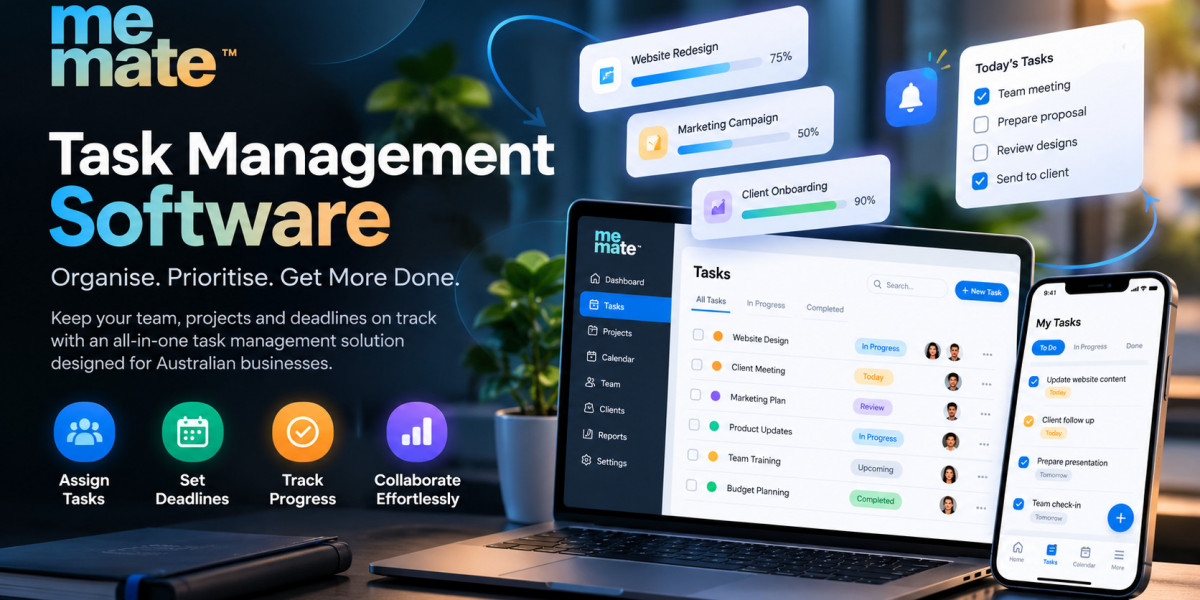
Platforms such as meMate can be relevant for businesses looking beyond isolated task lists and wanting task coordination to sit alongside broader operational activities. The important consideration is whether the platform's actual capabilities match the organisation's workflow and requirements.
Common Mistakes to Avoid
Businesses can undermine a good software investment by implementing it without a clear process. Common mistakes include:
- Choosing software because it has the longest feature list.
- Adding unnecessary complexity to simple workflows.
- Failing to define task ownership.
- Creating too many statuses, notifications or approval steps.
- Ignoring employee training and adoption.
- Tracking time without understanding what the data means.
- Failing to review whether the system is actually improving the workflow.
Start with a small number of practical workflows, establish clear rules and expand functionality as the team becomes comfortable with the system.
Frequently Asked Questions
Is task management software suitable for small businesses?
Yes. Small businesses can use it to organise responsibilities, deadlines and recurring work. The key is choosing a system that matches the team's complexity rather than paying for functionality it will not use.
What is the difference between task management and project management software?
Task management focuses on individual pieces of work and their progress. Project management generally covers a broader set of capabilities, potentially including tasks, schedules, resources, budgets, milestones and project reporting. The distinction varies between software providers.
Can task management software track employee time?
Some platforms include built-in time tracking, while others connect with dedicated time-tracking systems. Businesses should check whether tracking is available at the task, project or employee level and whether the reporting meets their needs.
Does task management software replace employee management software?
Not necessarily. Task management deals primarily with work and workflows, while employee management software can address broader workforce administration. Some business platforms combine both areas, but their capabilities should be assessed individually.
How many task management features does a business actually need?
There is no universal number. A useful starting point is to identify the workflows that currently cause delays or confusion and select features that directly address those problems. Additional functionality can be introduced as requirements develop.
Conclusion
Effective task management is ultimately about creating clarity around work. Employees need to know what they are responsible for, managers need visibility into progress and businesses need reliable processes for handling deadlines and recurring activities.
The right task management software should therefore fit the way a business actually operates. Evaluate its task, collaboration, workflow, time tracking, reporting, automation, integration and security capabilities against real requirements rather than choosing based on feature volume alone.
A practical approach is to test the software using genuine business workflows before committing. If employees can quickly understand what needs to be done, managers can see progress without chasing updates, and the system supports rather than complicates daily work, it is more likely to become a useful part of the organisation's operating process.