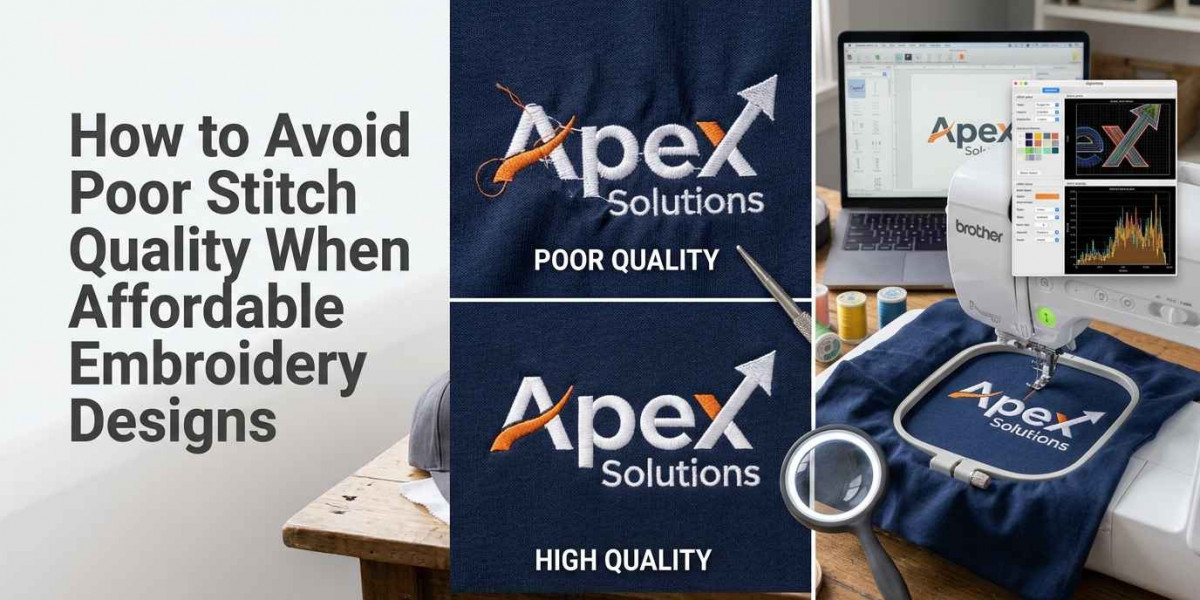

Buying affordable embroidery designs can help beginners, hobbyists, and small businesses control project costs. However, a low-priced design may create problems if its stitch settings are poorly prepared, its details are too small, or its file format is incompatible with your embroidery machine.
Poor stitch quality can lead to thread breaks, uneven coverage, fabric puckering, distorted lettering, and wasted materials. These problems may increase production costs and affect the final appearance of embroidered products.
The good news is that you can reduce these risks by checking a few important details before purchasing a design. This guide explains how to evaluate affordable embroidery designs, recognize possible quality issues, choose suitable files, and prepare for reliable stitching.
Why Do Affordable Embroidery Designs Sometimes Produce Poor Results?
The price of a digital embroidery file does not always reflect its technical quality. Some low-cost designs are carefully digitized, while others may contain unsuitable stitch settings or details that do not reproduce well on fabric.
Several factors can affect the finished result.
Poor Digitizing
Digitizing converts artwork into stitch instructions that an embroidery machine can follow. A well-prepared file accounts for stitch types, directions, density, underlay, and the order in which different areas are sewn.
If these elements are not planned properly, the finished design may have uneven coverage, rough outlines, or unnecessary thread changes.
Incorrect Stitch Density
Stitch density refers to how closely stitches are placed together. Excessive density can cause stiff embroidery, thread breaks, fabric distortion, or needle problems. Insufficient density may leave gaps where the fabric shows through.
The appropriate density depends on the design, fabric, thread, stabilizer, and machine settings. A file prepared for one material may require adjustments before it performs well on another.
Unsuitable Design Dimensions
A detailed design created for a large garment may lose important features when reduced to a small size. Fine lines, narrow gaps, and tiny letters can become difficult to reproduce.
Before buying a file, check its dimensions and compare them with the embroidery area available on your product.
Incorrect File Conversion
Embroidery machines use different file formats, and not every machine accepts every format. Converting a file without checking compatibility can introduce problems or leave you with a design that your machine cannot read correctly.
Always confirm the required format and verify the converted file before beginning production.
How to Check Embroidery Design Quality Before Buying
A careful review of the product listing can help you avoid files that are unsuitable for your needs.
1. Examine the Design Preview
Start by looking closely at the artwork preview. Check whether outlines are clear, letters are readable, and small shapes have enough space between them.
If the seller provides photographs of actual stitched samples, inspect those images as well. A digital illustration can look clean while the finished embroidery may reveal gaps, rough edges, or distorted details.
Pay particular attention to:
Small lettering and narrow outlines
Sharp corners and curved shapes
Areas with dense thread coverage
Gaps between neighboring design elements
Details that may disappear at the intended size
A preview cannot guarantee successful stitching, but it can help you identify potential concerns before purchasing.
2. Review the Stitch Count
Stitch count can help you estimate how much work a design may require. However, a higher count does not automatically indicate better quality.
A design with too many stitches may consume unnecessary thread and increase sewing time. A file with too few stitches may provide insufficient coverage for certain artwork or materials.
Compare the stitch count with the design's dimensions and complexity. If the seller provides a stitch preview or production details, use that information to evaluate whether the file appears suitable for your project.
3. Confirm the Available Sizes
Check the width and height of the embroidery file before buying. Make sure the dimensions fit your intended product and machine's embroidery area.
Avoid assuming that one file can be resized to every possible dimension without affecting quality. Significant resizing can change stitch lengths, spacing, and the appearance of fine details.
If you need the same logo for caps, shirts, and jackets, look for properly prepared size variations or ask whether professional resizing is available.
4. Check Supported File Formats
Common embroidery formats include PES, DST, JEF, EXP, and VP3. The correct format depends on your machine model and its software.
Read the product description to confirm which formats are included. If your required format is missing, contact the seller before purchasing rather than assuming that any conversion will work correctly.
Also check whether the seller provides the actual embroidery file or only an image preview. A JPG or PNG image is not the same as a machine-ready stitch file.
5. Read Customer Reviews
Customer reviews can reveal issues that are not visible in a product listing. Look for feedback about thread breaks, poor coverage, incorrect sizing, missing details, and compatibility problems.
Reviews that describe actual machine testing are particularly useful. If several buyers report similar stitching issues, consider another design or ask the seller for clarification.
How to Recognize Warning Signs in an Embroidery File
Some problems may be visible before you download or stitch a design. Learning to recognize these warning signs can help you make more informed purchasing decisions.
Excessive Stitching in Small Areas
If a small section appears unusually dense, the design may place too much thread in a limited area. This can make the fabric stiff or cause distortion.
Ask the seller about stitch construction when technical details are available. The actual result will also depend on the material, stabilizer, needle, and thread tension.
Tiny Text and Complicated Details
Very small lettering can be difficult to sew clearly, particularly on textured fabrics or curved surfaces. Thin scripts and tightly spaced characters may merge during stitching.
Choose a design prepared for the intended dimensions. If the text is essential, test a sample before using the file on customer products.
Poorly Connected Design Elements
Some files may contain unnecessary jumps, awkward transitions, or poorly planned stitch sequences. These issues can increase trimming time and affect the finished appearance.
A stitch simulation can help you inspect the sewing sequence when one is available. However, a preview should be treated as an initial check rather than proof of final quality.
Missing Technical Information
Be cautious when a product listing provides no clear dimensions, file formats, or usage terms. Missing information does not automatically mean a design is defective, but it makes it harder to judge whether the purchase will meet your requirements.
Ask the seller for the information you need before paying.
How to Choose Affordable Embroidery Designs for Different Fabrics
Fabric selection plays an important role in stitch quality. A design that works well on stable cotton may require different settings on stretch fabric, fleece, denim, or a structured cap.
Cotton and Linen
Cotton and linen are commonly used for towels, shirts, bags, and home décor. Choose a design with appropriate coverage and use a suitable stabilizer to help limit fabric movement.
For lightweight materials, test the design first to check whether the stitches pull the fabric out of shape.
Stretch Fabrics
Stretch materials can shift or distort during embroidery. A design with excessive density or unsuitable underlay may cause puckering or affect the fabric's flexibility.
Select designs suitable for the material and use the stabilizer and hooping method recommended for your project.
Denim and Heavy Fabrics
Denim and other heavy materials may require appropriate needles, thread, and machine settings. Dense designs can create bulky areas, particularly when several layers of stitching overlap.
Check whether the design is suitable for the garment thickness and available embroidery area.
Caps and Structured Headwear
Caps have curved surfaces and limited embroidery areas. Artwork intended for flat fabric may not sew correctly on a cap without adjustments to stitch direction, sequence, and design dimensions.
Choose a file prepared for cap embroidery when possible. For company logos or detailed designs, professional digitizing may help achieve more reliable results.
Why Machine Compatibility Matters for Stitch Quality
Machine compatibility involves more than selecting a file extension. The machine must also support the design's dimensions and process the stitch instructions correctly.
Before buying, check your machine's supported formats, maximum embroidery area, and any software requirements. Confirm that the design does not exceed the available stitching field.
If you need to convert a file, review it in compatible embroidery software before transferring it to the machine. Inspect the dimensions, stitch sequence, and any warnings reported by the software.
A compatible file still needs suitable thread, needle, stabilizer, tension, and hooping. Correct file selection reduces one source of problems, but it cannot guarantee a perfect result under every condition.
How to Test an Affordable Embroidery Design Before Production
Testing is especially important when you plan to use a design for customer orders or repeat production.
Use the Intended Fabric
Whenever possible, stitch a sample on the same type of material used for the finished product. Different fabrics react differently to thread tension, density, and needle movement.
A successful test on cotton does not necessarily predict the result on fleece or stretch fabric.
Use Suitable Stabilizer and Thread
Select stabilizer according to the fabric and design. Use an appropriate needle and thread, and follow the machine manufacturer's recommendations.
If the test has problems, check the setup before assuming the design file is defective. Incorrect tension, a worn needle, unsuitable stabilizer, or poor hooping can also affect the result.
Inspect the Finished Sample
After stitching, examine the design for gaps, puckering, loose threads, uneven lettering, and distorted outlines. Check whether the fabric remains flat and whether the design looks balanced at the intended viewing distance.
If the sample has issues, identify the likely cause before adjusting the file or changing machine settings.
Keep a Record of Successful Settings
For repeat projects, record the fabric type, stabilizer, needle, thread, machine settings, and design version used for the successful test.
This record can help you repeat the process more consistently and reduce unnecessary experimentation on future orders.
Common Mistakes to Avoid When Buying Affordable Embroidery Designs
One frequent mistake is selecting a design solely because it has the lowest price. If the file requires extensive corrections or produces poor results, the initial saving may disappear.
Another mistake is assuming that a high stitch count guarantees quality. Stitch construction, density, dimensions, and material suitability are also important.
Some buyers overlook commercial licensing. A design that is available for personal use may not be approved for products sold to customers. Check the seller's terms before using any artwork commercially.
Finally, avoid resizing complex artwork without inspecting the result. If important details become unclear, use a properly prepared version or request professional adjustments.
When Should You Choose Professional Embroidery Digitizing?
Ready-made designs are useful for many decorative projects, but custom digitizing may be the better option when the artwork has specific technical requirements.
Professional digitizing is worth considering when:
You need an accurate company logo.
Small lettering must remain readable.
The design will be stitched on caps or difficult fabrics.
You need consistent results across multiple product sizes.
A purchased file produces repeated problems after machine setup has been checked.
A digitizer can prepare stitch instructions based on the artwork, intended dimensions, and fabric requirements. However, the final result still depends on the machine setup, materials, and testing process.
Before placing a large order, request a sample or test the finished file on the intended product. This gives you an opportunity to identify problems before using the design in full production.
Conclusion
Avoiding poor stitch quality when buying affordable embroidery designs begins with careful evaluation. Review the design preview, stitch count, dimensions, file format, customer feedback, and licensing terms before purchasing. Choose artwork that suits your machine and fabric, and test important designs before producing multiple items.
A low purchase price is useful only when the file performs well for your intended project. For detailed logos, small lettering, caps, or repeat orders, professional digitizing may help reduce avoidable production problems. For embroidery digitizing support and related services, visit zdigitizing.net and select an option suited to your artwork and production needs.
Frequently Asked Questions
Q1. How can I avoid poor stitch quality when buying affordable embroidery designs?
Review the preview, dimensions, stitch count, file formats, and customer feedback. Test the file on the intended fabric before using it for a large order.
Q2. Does a low price mean an embroidery design is poor quality?
No. Some affordable files are carefully prepared. Evaluate the technical details and test the design rather than judging quality by price alone.
Q3. What causes gaps in embroidery stitching?
Gaps may result from insufficient coverage, unsuitable stitch density, fabric movement, incorrect settings, or a design that has not been prepared correctly for the material.
Q4. Can excessive stitch density damage fabric?
Excessive density can cause puckering, stiffness, thread breaks, or needle problems. The suitable density depends on the design, fabric, thread, stabilizer, and machine setup.
Q5. Which embroidery file formats should I check before buying?
Common formats include PES, DST, JEF, EXP, and VP3. Confirm the supported format for your exact embroidery machine before purchasing.
Q6. Is a high stitch count a sign of good quality?
Not necessarily. Stitch count should be evaluated alongside the design's size, complexity, stitch construction, and intended fabric.
Q7. Why should I test a design before selling embroidered products?
Testing helps identify problems such as poor coverage, distorted lettering, thread breaks, and fabric puckering before you commit materials and time to a large order.
Q8. Can I resize a purchased embroidery design?
Some resizing is possible, but major changes can affect stitch lengths, density, and small details. Use a version prepared for your required size whenever possible.
Q9. How can I tell whether a design is suitable for caps?
Check whether the file was prepared for cap embroidery and whether its dimensions fit your machine and cap frame. Detailed logos may require specialized digitizing and testing.
Q10. When should I pay for custom embroidery digitizing?
Consider custom digitizing for company logos, small lettering, difficult fabrics, multiple sizes, and designs that repeatedly produce poor results despite correct machine setup.